Automatic CRUD
If you have a lot of experience writing full-stack apps, you probably ended up doing some of the same things many times: listing data, adding data, editing it, and deleting it.
Wasp makes handling these boring bits easy by offering a higher-level concept called Automatic CRUD.
With a single spec, you can tell Wasp to automatically generate server-side logic (i.e., Queries and Actions) for creating, reading, updating and deleting Entities. As you update definitions for your Entities, Wasp automatically regenerates the backend logic.
This feature is currently in early preview and we are actively working on it. Read more about our plans for CRUD operations.
Overview
Imagine we have a Task entity and we want to enable CRUD operations for it:
model Task {
  id          Int     @id @default(autoincrement())
  description String
  isDone      Boolean
}
We can then define a new crud called Tasks.
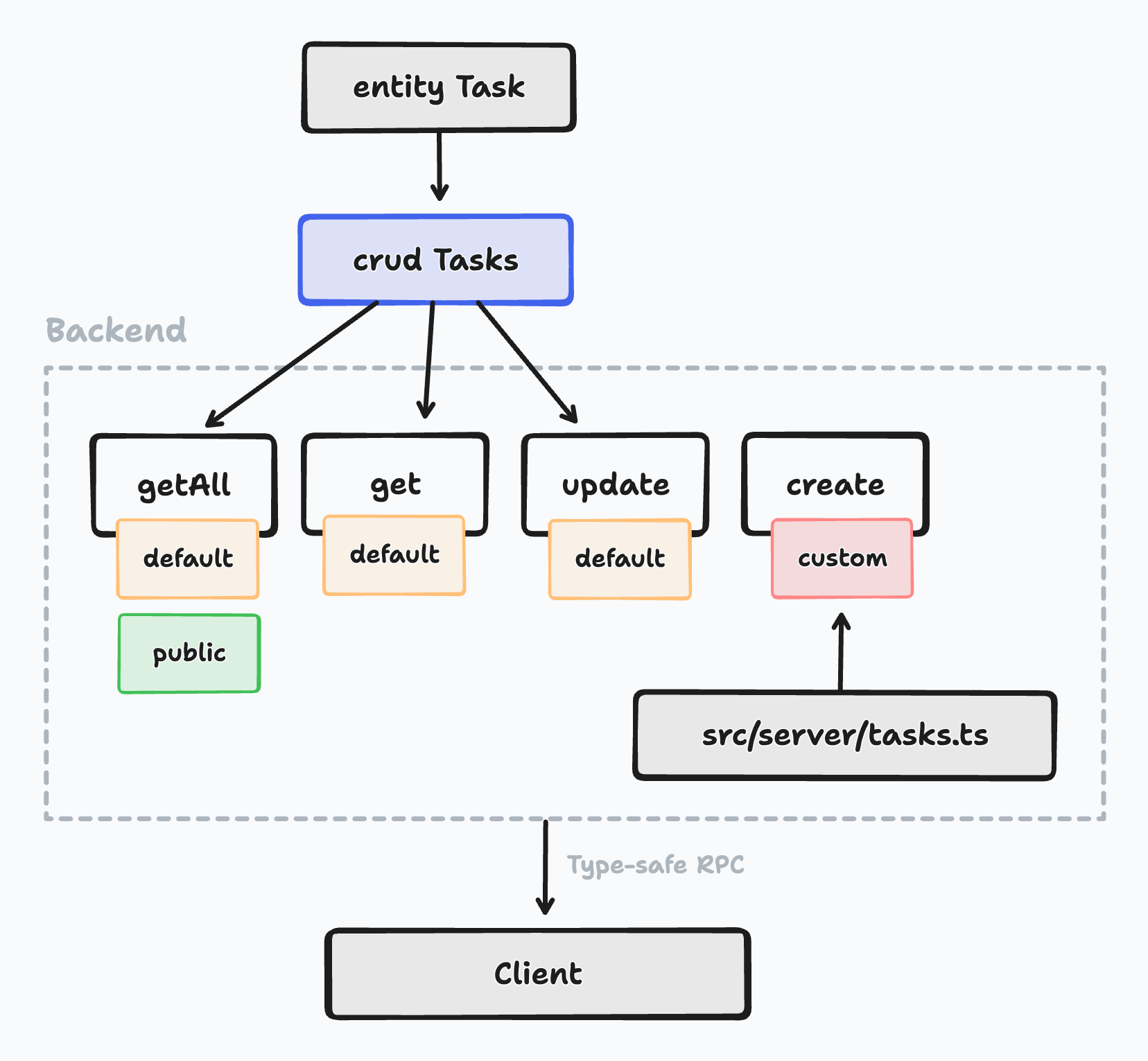
We specify to use the Task entity and we enable the getAll, get, create and update operations (let's say we don't need the delete operation).
import { app, crud } from "@wasp.sh/spec"
import { createTask } from "./src/tasks" with { type: "ref" }

export default app({
  // ...
  spec: [
    crud("Tasks", "Task", {
      getAll: {
        isPublic: true, // by default only logged in users can perform operations
      },
      get: {},
      create: {
        overrideFn: createTask,
      },
      update: {},
    }),
  ],
})
- It uses default implementation for
getAll,get, andupdate, - ... while specifying a custom implementation for
create. getAllwill be public (no auth needed), while the rest of the operations will be private.
Here's what it looks like when visualized:
We can now use the CRUD queries and actions we just specified in our client code.
Keep reading for an example of Automatic CRUD in action, or skip ahead for the API Reference.
Example: A Simple ToDo App
Let's create a full-app example that uses automatic CRUD. We'll stick to using the Task entity from the previous example, but we'll add a User entity and enable username and password based auth.
Creating the App
We can start by running wasp new tasksCrudApp and then adding the following to the main.wasp.ts file:
import { app, page, route } from "@wasp.sh/spec"
import { LoginPage } from "./src/LoginPage" with { type: "ref" }
import { MainPage } from "./src/MainPage" with { type: "ref" }
import { SignupPage } from "./src/SignupPage" with { type: "ref" }

export default app({
  name: "tasksCrudApp",
  wasp: { version: "^0.24" },
  title: "Tasks Crud App",
  head: ["<link rel='icon' href='/favicon.ico' />"],

  // We enabled auth and set the auth method to username and password
  auth: {
    userEntity: "User",
    methods: {
      usernameAndPassword: {},
    },
    onAuthFailedRedirectTo: "/login",
  },
  spec: [
    // Tasks app routes
    route("RootRoute", "/", page(MainPage, { authRequired: true, })),
    route("LoginRoute", "/login", page(LoginPage)),
    route("SignupRoute", "/signup", page(SignupPage)),
  ],
})
And let's define our entities in the schema.prisma file:
model User {
  id    Int    @id @default(autoincrement())
  tasks Task[]
}

// We defined a Task entity on which we'll enable CRUD later on
model Task {
  id          Int     @id @default(autoincrement())
  description String
  isDone      Boolean
  userId      Int
  user        User    @relation(fields: [userId], references: [id])
}
We can then run wasp db migrate-dev to create the database and run the migrations.
Adding CRUD to the Task Entity ✨
Let's add the following crud spec to our main.wasp.ts file:
import { app, crud } from "@wasp.sh/spec"
import { createTask } from "./src/tasks" with { type: "ref" }

export default app({
  // ...
  spec: [
    crud("Tasks", "Task", {
      getAll: {},
      create: {
        overrideFn: createTask,
      },
    }),
  ],
})
You'll notice that we enabled only getAll and create operations. This means that only these operations will be available.
We also overrode the create operation with a custom implementation. This means that the create operation will not be generated, but instead, the createTask function from src/tasks.ts will be used.
Our Custom create Operation
We need a custom create operation because we want to make sure that the task is connected to the user creating it.
Automatic CRUD doesn't yet support this by default.
Read more about the default implementations in the CrudOperations API Reference.
Here's the src/tasks.ts file:
- JavaScript
- TypeScript
import { HttpError } from "wasp/server"

export const createTask = async (args, context) => {
  if (!context.user) {
    throw new HttpError(401, "User not authenticated.")
  }

  const { description, isDone } = args
  const { Task } = context.entities

  return await Task.create({
    data: {
      description,
      isDone,
      // Connect the task to the user that is creating it
      user: {
        connect: {
          id: context.user.id,
        },
      },
    },
  })
}
import { type Tasks } from "wasp/server/crud"
import { type Task } from "wasp/entities"
import { HttpError } from "wasp/server"

type CreateTaskInput = { description: string; isDone: boolean }

export const createTask: Tasks.CreateAction<CreateTaskInput, Task> = async (
  args,
  context
) => {
  if (!context.user) {
    throw new HttpError(401, "User not authenticated.")
  }

  const { description, isDone } = args
  const { Task } = context.entities

  return await Task.create({
    data: {
      description,
      isDone,
      // Connect the task to the user that is creating it
      user: {
        connect: {
          id: context.user.id,
        },
      },
    },
  })
}
Wasp automatically generates the Tasks.CreateAction type based on the CRUD spec in your Wasp file.
Use it to type the CRUD action's implementation.
The Tasks.CreateAction type works exactly like the types Wasp generates for Queries and Actions.
In other words, annotating the action with Tasks.CreateAction tells TypeScript about the type of the Action's context object, while the two type arguments allow you to specify the Action's inputs and outputs.
Read more about type support for CRUD overrides in the API reference.
Using the Generated CRUD Operations on the Client
And let's use the generated operations in our client code:
- JavaScript
- TypeScript
import { Tasks } from "wasp/client/crud"
import { useState } from "react"

export const MainPage = () => {
  const { data: tasks, isLoading, error } = Tasks.getAll.useQuery()
  const createTask = Tasks.create.useAction()
  const [taskDescription, setTaskDescription] = useState("")

  function handleCreateTask() {
    createTask({ description: taskDescription, isDone: false })
    setTaskDescription("")
  }

  if (isLoading) return <div>Loading...</div>
  if (error) return <div>Error: {error.message}</div>
  return (
    <div
      style={{
        fontSize: "1.5rem",
        display: "grid",
        placeContent: "center",
        height: "100vh",
      }}
    >
      <div>
        <input
          value={taskDescription}
          onChange={(e) => setTaskDescription(e.target.value)}
        />
        <button onClick={handleCreateTask}>Create task</button>
      </div>
      <ul>
        {tasks.map((task) => (
          <li key={task.id}>{task.description}</li>
        ))}
      </ul>
    </div>
  )
}
import { Tasks } from "wasp/client/crud"
import { useState } from "react"

export const MainPage = () => {
  // Thanks to full-stack type safety, all payload types are inferred
  // automatically
  const { data: tasks, isLoading, error } = Tasks.getAll.useQuery()
  const createTask = Tasks.create.useAction()
  const [taskDescription, setTaskDescription] = useState("")

  function handleCreateTask() {
    createTask({ description: taskDescription, isDone: false })
    setTaskDescription("")
  }

  if (isLoading) return <div>Loading...</div>
  if (error) return <div>Error: {error.message}</div>
  return (
    <div
      style={{
        fontSize: "1.5rem",
        display: "grid",
        placeContent: "center",
        height: "100vh",
      }}
    >
      <div>
        <input
          value={taskDescription}
          onChange={(e) => setTaskDescription(e.target.value)}
        />
        <button onClick={handleCreateTask}>Create task</button>
      </div>
      <ul>
        {tasks.map((task) => (
          <li key={task.id}>{task.description}</li>
        ))}
      </ul>
    </div>
  )
}
And here are the login and signup pages, where we are using Wasp's Auth UI components:
- JavaScript
- TypeScript
import { LoginForm } from "wasp/client/auth"
import { Link } from "react-router"

export function LoginPage() {
  return (
    <div
      style={{
        display: "grid",
        placeContent: "center",
      }}
    >
      <LoginForm />
      <div>
        <Link to="/signup">Create an account</Link>
      </div>
    </div>
  )
}
import { LoginForm } from "wasp/client/auth"
import { Link } from "react-router"

export function LoginPage() {
  return (
    <div
      style={{
        display: "grid",
        placeContent: "center",
      }}
    >
      <LoginForm />
      <div>
        <Link to="/signup">Create an account</Link>
      </div>
    </div>
  )
}
- JavaScript
- TypeScript
import { SignupForm } from "wasp/client/auth"

export function SignupPage() {
  return (
    <div
      style={{
        display: "grid",
        placeContent: "center",
      }}
    >
      <SignupForm />
    </div>
  )
}
import { SignupForm } from "wasp/client/auth"

export function SignupPage() {
  return (
    <div
      style={{
        display: "grid",
        placeContent: "center",
      }}
    >
      <SignupForm />
    </div>
  )
}
That's it. You can now run wasp start and see the app in action. ⚡️
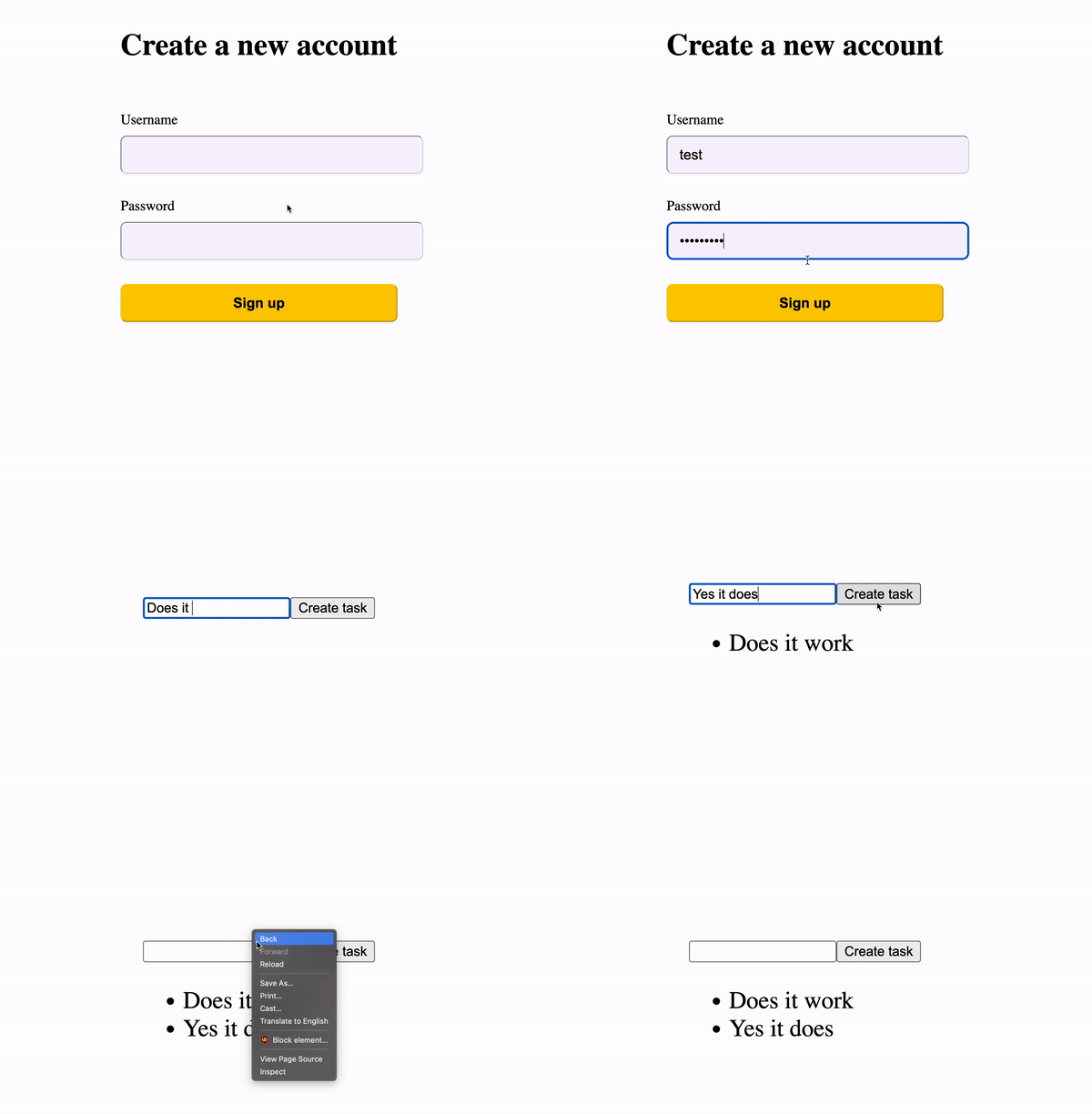
You should see a login page and a signup page. After you log in, you should see a page with a list of tasks and a form to create new tasks.
Future of CRUD Operations in Wasp
CRUD operations currently have a limited set of knowledge about the business logic they are implementing.
- For example, they don't know that a task should be connected to the user that is creating it. This is why we had to override the
createoperation in the example above. - Another thing: they are not aware of the authorization rules. For example, they don't know that a user should not be able to create a task for another user. In the future, we will be adding role-based authorization to Wasp, and we plan to make CRUD operations aware of the authorization rules.
- Another issue is input validation and sanitization. For example, we might want to make sure that the task description is not empty.
CRUD operations are a mechanism for getting a backend up and running quickly, but it depends on the information it can get from the Wasp app. The more information that it can pick up from your app, the more powerful it will be out of the box.
We plan on supporting CRUD operations and growing them to become the easiest way to create your backend. Follow along on this GitHub issue to see how we are doing.
API Reference
Specifying CRUD Operations
crud »
All the options for declaring CRUD operations in the Wasp spec.
Defining the overrides
Like with actions and queries, you can define the implementation in a Javascript/Typescript file. The overrides are functions that take the following arguments:
-
argsThe arguments of the operation i.e. the data sent from the client.
-
contextContext contains the
usermaking the request and theentitiesobject with the entity that's being operated on.
You can also import types for each of the functions you want to override by importing the {crud name} from wasp/server/crud. The available types are:
{crud name}.GetAllQuery{crud name}.GetQuery{crud name}.CreateAction{crud name}.UpdateAction{crud name}.DeleteAction
If you have a CRUD named Tasks, you would import the types like this:
import { type Tasks } from "wasp/server/crud"

// Each of the types is a generic type, so you can use it like this:
export const getAllOverride: Tasks.GetAllQuery<Input, Output> = async (
  args,
  context
) => {
  // ...
}
For a usage example, check the example guide.
Using the CRUD operations in client code
On the client, you import the CRUD operations from wasp/client/crud by import the {crud name} object. For example, if you have a CRUD called Tasks, you would import the operations like this:
- JavaScript
- TypeScript
import { Tasks } from "wasp/client/crud"
import { Tasks } from "wasp/client/crud"
You can then access the operations like this:
- JavaScript
- TypeScript
const { data } = Tasks.getAll.useQuery()
const { data } = Tasks.get.useQuery({ id: 1 })
const createAction = Tasks.create.useAction()
const updateAction = Tasks.update.useAction()
const deleteAction = Tasks.delete.useAction()
const { data } = Tasks.getAll.useQuery()
const { data } = Tasks.get.useQuery({ id: 1 })
const createAction = Tasks.create.useAction()
const updateAction = Tasks.update.useAction()
const deleteAction = Tasks.delete.useAction()
All CRUD operations are implemented with Queries and Actions under the hood, which means they come with all the features you'd expect (e.g., automatic SuperJSON serialization, full-stack type safety when using TypeScript)